
Global Constant Editor
The Global Constant Editor defines and manages project-wide named constants (Global Constants) in one place. By registering frequently used fixed values under meaningful names, scripts and screens can reference them by name instead of writing raw numbers, reducing magic numbers. Open it from Project → Global Constant Editor, the Constant Value Editor toolbar button, or the Constant Value Editor item in the Solution Explorer.
This editor shares the same grid-based editor (TextEditorPage) as the GUI Text Editor; only the type of catalog differs. While the GUI Text Editor handles on-screen display text, this editor edits global constant values row by row.
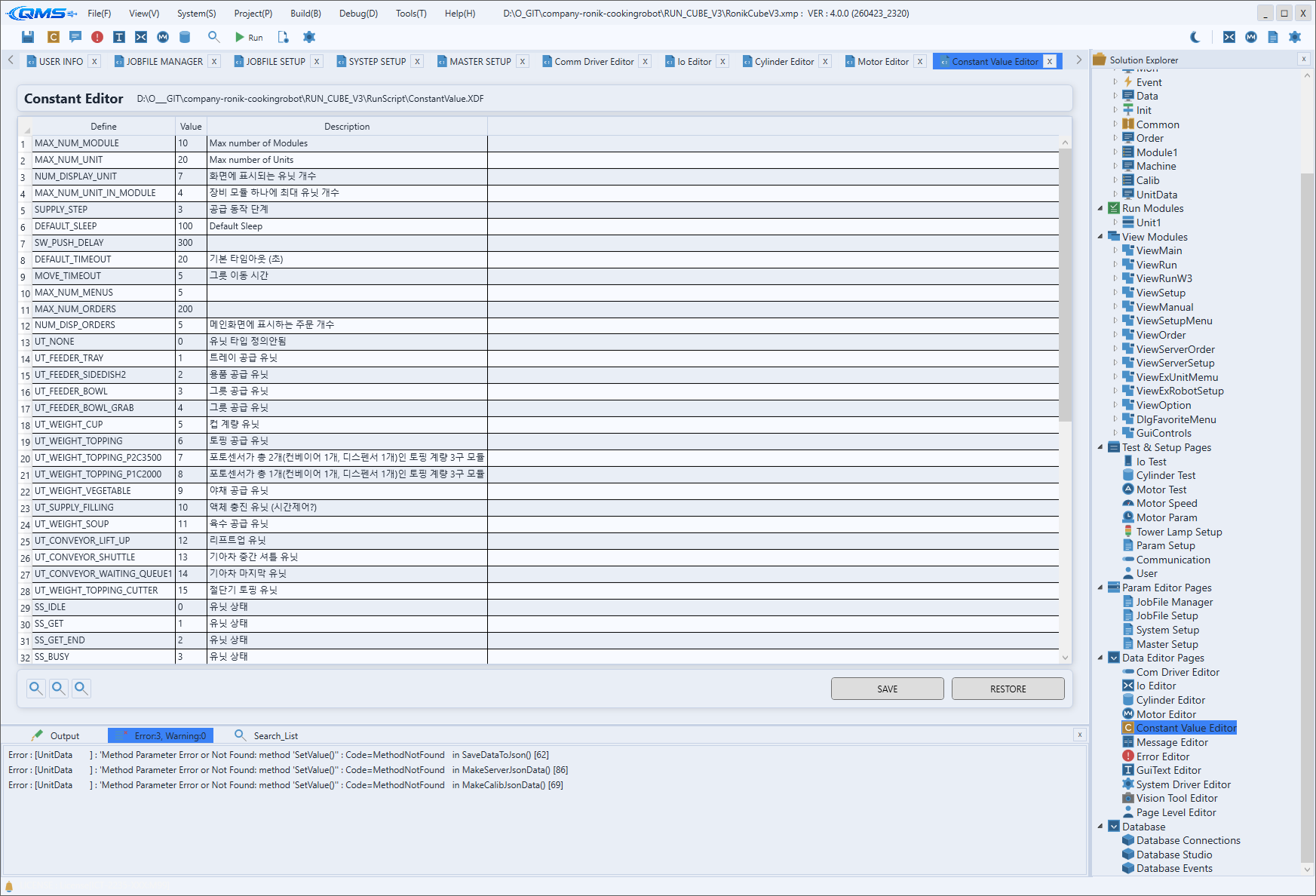
Main areas
From top to bottom, the screen has a header, an editing grid, and a bottom tools/save area.
| Area | Description |
|---|---|
| Header | Title and File labels show the title and file of the catalog currently being edited. |
| Editing grid | A table where each row is one global constant. Cells are selected and edited individually. |
| Bottom area | Zoom buttons on the left and SAVE · RESTORE buttons on the right. |
Editing grid
Each row represents one constant; enter the constant's name, value, and description. Right-clicking the grid opens a context menu for managing rows.
| Menu | Action |
|---|---|
Add Row | Adds a new constant row. |
Duplicate Row | Duplicates the selected row. |
Move Up · Move Down | Moves the selected row up or down. |
Delete Row | Deletes the selected row. |
Increment Number | Fills the selected range, increasing the number by one each step. |
Bottom tools
The zoom buttons on the lower left enlarge, shrink, or reset the grid display scale. On the lower right, SAVE saves the edited constant catalog and RESTORE reverts to the last saved state.
Usage guidance
Constants pay off most for values "used in many places" or "likely to be changed all at once later" (wait times, repeat counts, thresholds, and so on). There is no need to turn every one-off value used in a single place into a constant. Choose names that reveal what the value means, so the intent comes across when reading scripts without separately explaining the number.